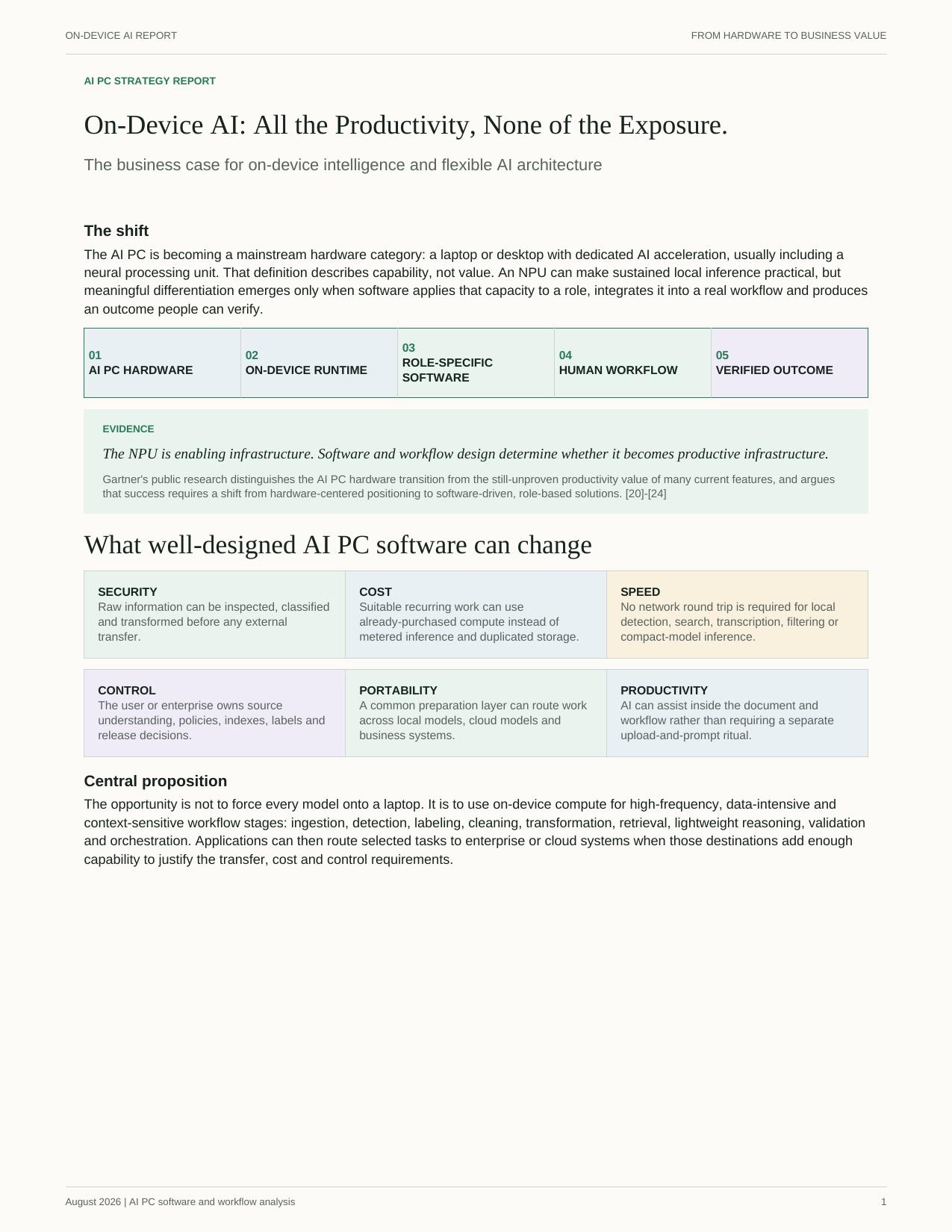
On-Device AI: All the Productivity, None of the Exposure.
AI-capable computers are now mainstream. But most AI still ships your data to someone else's cloud — with the compliance review, vendor risk, and exposure that comes with it. The real opportunity is software that puts that hardware to work on the data already in front of you, with nothing leaving the machine.
AI hardware creates capacity. Edge-AI software turns it into useful work.
An AI PC contains dedicated acceleration for local AI workloads, often including a neural processing unit. That makes sustained on-device inference more practical, but it does not create a business outcome by itself.
Meaningful differentiation begins when software applies that capacity to a specific role, integrates with an existing workflow and produces a result that a person or organization can verify.
From AI PC hardware to verified outcome: AI PC hardware (CPU, GPU, NPU, memory and storage) leads to an on-device runtime that executes appropriate models locally, then to role-specific software that detects, prepares, retrieves and applies policy, then to a human workflow that reviews, corrects, approves and acts, and finally to a verified outcome that produces approved information, evidence or completed work.
1
AI PC HARDWARE
CPU, GPU, NPU, memory and storage.
2
ON-DEVICE RUNTIME
Executes appropriate models locally.
3
ROLE-SPECIFIC SOFTWARE
Detects, prepares, retrieves and applies policy.
4
HUMAN WORKFLOW
Reviews, corrects, approves and acts.
5
VERIFIED OUTCOME
Produces approved information, evidence or completed work.
1
AI PC HARDWARE
CPU, GPU, NPU, memory and storage.
→
2
ON-DEVICE RUNTIME
Executes appropriate models locally.
→
3
ROLE-SPECIFIC SOFTWARE
Detects, prepares, retrieves and applies policy.
→
4
HUMAN WORKFLOW
Reviews, corrects, approves and acts.
→
5
VERIFIED OUTCOME
Produces approved information, evidence or completed work.
Gartner's public research makes the same strategic distinction: PC vendors need to move beyond hardware-centered positioning toward software-defined, role-based applications that deliver clear user value.
Key findings
Why on-device software matters
Finding 01
Reduce unnecessary exposure
Detection, classification and transformation can happen before information crosses a network or enters another provider's environment. This can reduce the number of systems that require access to raw data, while leaving endpoint security, model governance and output protection as essential responsibilities.
Finding 02
Put assistance inside the work
Local search, transcription, document preparation and background classification can accompany the user's files and applications. People spend less time moving information into a separate AI destination and repeatedly rebuilding the same context.
Finding 03
Use capacity the organization already owns
Many professionals already work on capable laptops and desktops. Suitable recurring tasks can use that installed CPU, GPU, NPU, memory and storage instead of sending every operation to metered infrastructure. Savings remain workload-specific and must be measured against deployment, support, energy and governance costs.
Finding 04
Keep destinations replaceable
When source understanding, labels, transformations, policies and review history remain under user or enterprise control, local models, organization-controlled servers and cloud services can become replaceable execution choices rather than owners of the workflow.
From information to action
A strong first use case: prepare information where it already lives
Before an AI system can reason over professional or enterprise information, that information must be parsed, classified, cleaned and made usable. This work is frequent, data-intensive and often privacy-sensitive—making it a strong candidate for on-device execution.
The local data engine, in order: ingest files, spreadsheets, email, images, audio and business data; parse text, tables, structure and metadata; detect sensitive data, secrets, anomalies and custom fields; label sensitivity, purpose, ownership and destination; clean by normalizing formats and removing unnecessary or malformed content; index to build private search and retrieval structures; review, letting the person closest to the information confirm uncertain or consequential findings; and release, keeping the task local or sending only the approved representation to an authorized destination.
1
INGEST
Files, spreadsheets, email, images, audio and business data.
2
PARSE
Extract text, tables, structure and metadata.
3
DETECT
Find sensitive data, secrets, anomalies and custom fields.
4
LABEL
Record sensitivity, purpose, ownership and destination.
5
CLEAN
Normalize formats and remove unnecessary or malformed content.
6
INDEX
Build private search and retrieval structures.
7
REVIEW
Let the person closest to the information confirm uncertain or consequential findings.
8
RELEASE
Keep the task local or send only the approved representation to an authorized destination.
1
INGEST
Files, spreadsheets, email, images, audio and business data.
→
2
PARSE
Extract text, tables, structure and metadata.
→
3
DETECT
Find sensitive data, secrets, anomalies and custom fields.
→
4
LABEL
Record sensitivity, purpose, ownership and destination.
→
5
CLEAN
Normalize formats and remove unnecessary or malformed content.
→
6
INDEX
Build private search and retrieval structures.
→
7
REVIEW
Let the person closest to the information confirm uncertain or consequential findings.
→
8
RELEASE
Keep the task local or send only the approved representation to an authorized destination.
The review loop: machine suggests, person confirms, policy applies, result is reused.
MACHINE SUGGESTS→
PERSON CONFIRMS→
POLICY APPLIES→
RESULT IS REUSED
The person doing the work often understands the documents, relationships and exceptions better than a centralized reviewer. A well-designed system uses that context without turning every item into a manual task: it surfaces uncertainty, records corrections and reuses confirmed understanding in later workflows.
RangerIO illustrates this application pattern through on-device detection and labeling, human confirmation and a controlled path to an approved AI destination. It is one example of the software layer described here, not evidence that every implementation will produce the same outcome.
Workflow opportunities
The same architecture can support many kinds of work
Audit and finance:
Profile ledgers, reconcile fields, classify evidence and prepare reviewed work sets.
Legal and HR:
Classify matters, identify sensitive clauses and prepare approved extracts while preserving context.
Healthcare:
Transcribe, structure and detect identifiers before approved analysis or quality workflows.
Compliance and privacy:
Inventory sensitive information, confirm categories and record purpose and handling decisions.
Security:
Detect secrets, restricted data or anomalies at the point of action.
Knowledge work:
Search, summarize, translate and draft over local or team-controlled material.
Actual suitability depends on model quality, device capability, policy, user review, system integration and the consequences of error.
Architecture
Local, hybrid and cloud each have a role
Prefer on-device
Sensitive raw data, frequent bounded work, low-latency or offline requirements, adequate local hardware and reviewable outputs.
Prefer hybrid
Local preparation can reduce or structure the context, while a remote model materially improves the final task and the transfer is approved.
Prefer centralized
The workload needs high concurrency, shared state, very large models or mature central controls, and the data terms are acceptable.
The important design decision is not whether an entire application is local or remote. It is where each workflow stage should run.
Go beyond the NPU specification.
Download the full report for the technical architecture, security responsibilities, economics framework, future capability horizon, adoption roadmap and all 25 references.