Connect AI to RangerIO
Your key gives you access to AI models
Think of it like a password for your AI service. An API key is a private access code that lets RangerIO connect to AI model providers.
Important
A ChatGPT or Claude subscription does not include API access. API usage is set up and billed separately by the AI provider.
1
Choose your provider and get your API key
Click below to create an account and get your API key.
2
Add your API key to RangerIO
Open RangerIO, paste your API key, and you're ready to go.
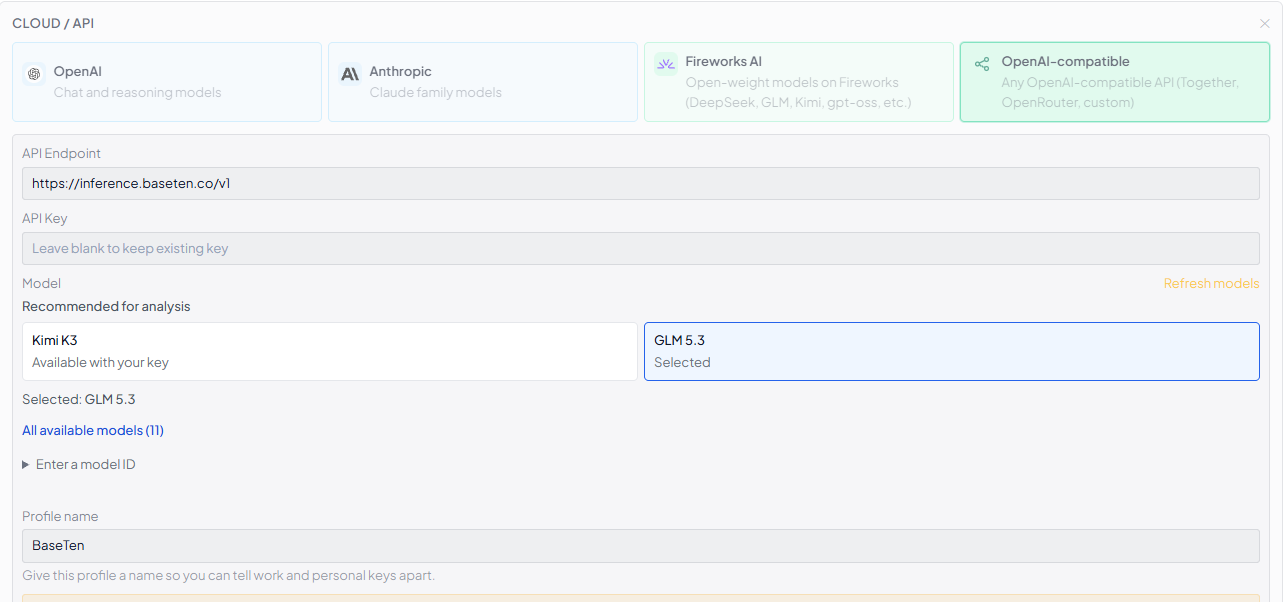
Paste your API key
Select the provider, paste your key, and click Test to connect. That's it.
Your key stays on your device
RangerIO stores your API key locally and connects directly to the AI provider you choose.
Your files
(on your device)
RangerIO
(processes locally)
AI provider
(OpenAI, Anthropic, etc.)